
Website performance

Four scores. What they mean for shoppers.

Google Lighthouse grades a page in Performance, Accessibility, Best Practices, and SEO. Here is what each one measures, why it matters to people shopping for a car, and how we improve and track it.

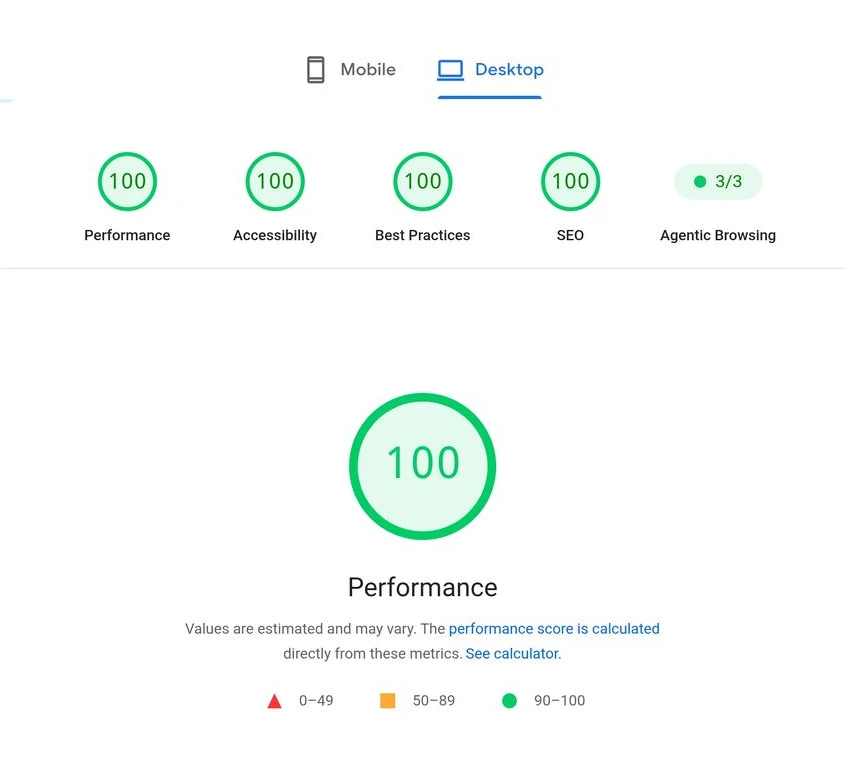
PageSpeed Insights desktop test result showing scores of 100 for Performance, Accessibility, Best Practices, and SEO, plus an agentic browsing result of 3 of 3
Supplied desktop test example for a single page and run. Scores vary by page, device, and test run. This is not a promise that every customer site will score 100.

Performance

What it measures

Lab metrics from a simulated load: Largest Contentful Paint, Total Blocking Time, Cumulative Layout Shift, First Contentful Paint, and Speed Index.

Why it matters to shoppers

Shoppers often browse inventory on a phone, on a lot, or on weak signal. A slow VDP or a search results page that jumps while loading costs attention before a shopper reaches the price or the contact button.

Practical improvements

  • Size and compress vehicle photos, and lazy-load images below the fold
  • Reserve space for images, widgets, and banners so nothing shifts
  • Defer chat, tracking, and third-party scripts that are not needed for first render
  • Keep JavaScript bundles small and split by page

Accessibility

What it measures

Automated checks such as color contrast, image alt text, form labels, button names, heading order, and valid ARIA use.

Why it matters to shoppers

Shoppers with low vision, motor limitations, or who use screen readers need to filter inventory, read prices, and submit a lead form. Clear labels and contrast also help everyone reading a screen in sunlight.

Practical improvements

  • Write descriptive alt text for vehicle and offer images
  • Label every form field, including trade-in and finance steps
  • Check contrast on buttons, disclaimers, and price text
  • Test keyboard navigation and focus states by hand

An automated score of 100 is not full accessibility compliance. Lighthouse catches only a subset of issues; manual and assistive technology testing are still needed.

Best Practices

What it measures

General web health: HTTPS, no browser console errors, correct image aspect ratios, no deprecated APIs, and safe handling of third-party content.

Why it matters to shoppers

Broken scripts and console errors often show up as payment calculators that fail to load or forms that never submit. Shoppers rarely report these; they simply leave.

Practical improvements

  • Review console errors after every vendor script or widget change
  • Serve everything over HTTPS, including embedded tools
  • Remove unused or outdated third-party tags

Best Practices is not a security audit. It does not replace a review of your hosting, forms, data handling, or vendor access.

SEO

What it measures

Technical basics that let search engines read a page: title and meta description, crawlable links, valid robots rules, canonical tags, and legible text on mobile.

Why it matters to shoppers

Shoppers searching for a model, a service, or a dealer near them need your pages to be indexable and clearly described before content and reputation can do the rest.

Practical improvements

  • Give each inventory, model, and service page a unique title and description
  • Use real links between inventory, finance, and service pages
  • Keep canonical tags and robots rules correct after site changes

An SEO score of 100 is not a ranking guarantee. It confirms technical basics, not content quality, relevance, links, or local signals.

Mobile and real visits

Lab scores are a test.
Field data is your shoppers.

The example above is a desktop lab test: one simulated load under fixed conditions. Mobile tests use a slower simulated device and network, so mobile scores are usually lower and matter more for most dealership traffic. Field data, the Core Web Vitals collected from real Chrome users, shows what shoppers actually experienced.

  1. LCPLargest Contentful Paint. How long until the main content, often the lead vehicle photo, appears.
  2. INPInteraction to Next Paint. How quickly the page responds when a shopper taps a filter, gallery, or calculator.
  3. CLSCumulative Layout Shift. How much the layout moves while loading, which causes mis-taps.

Lab tools are best for diagnosing and verifying a fix. Field data is best for judging real experience, and it needs enough traffic before it appears.

Tracking cadence

Test once, then
keep testing.

  1. Before launchTest key templates: home, search results, VDP, specials, finance, and contact, on mobile and desktop.
  2. After every changeRe-test the affected pages when adding a widget, tag, vendor script, or new template.
  3. MonthlyReview PageSpeed lab scores for key templates and fix regressions.
  4. OngoingWatch field data for LCP, INP, and CLS in Search Console, which reflects about 28 days of real visits.

Related: Custom dealership websites Web design and CRO

Want a faster, clearer site?

We can review how your current pages test on mobile and desktop, or build a new site with performance checked before launch.