Consent Banners

Ask shoppers first. Keep every store on brand.

One workspace to set up, style, and install consent banners across your rooftops or your agency's dealer clients, with Consent Mode v2 signals your tags can actually read.

Sign-in is for existing workspace users. New accounts start with a conversation.

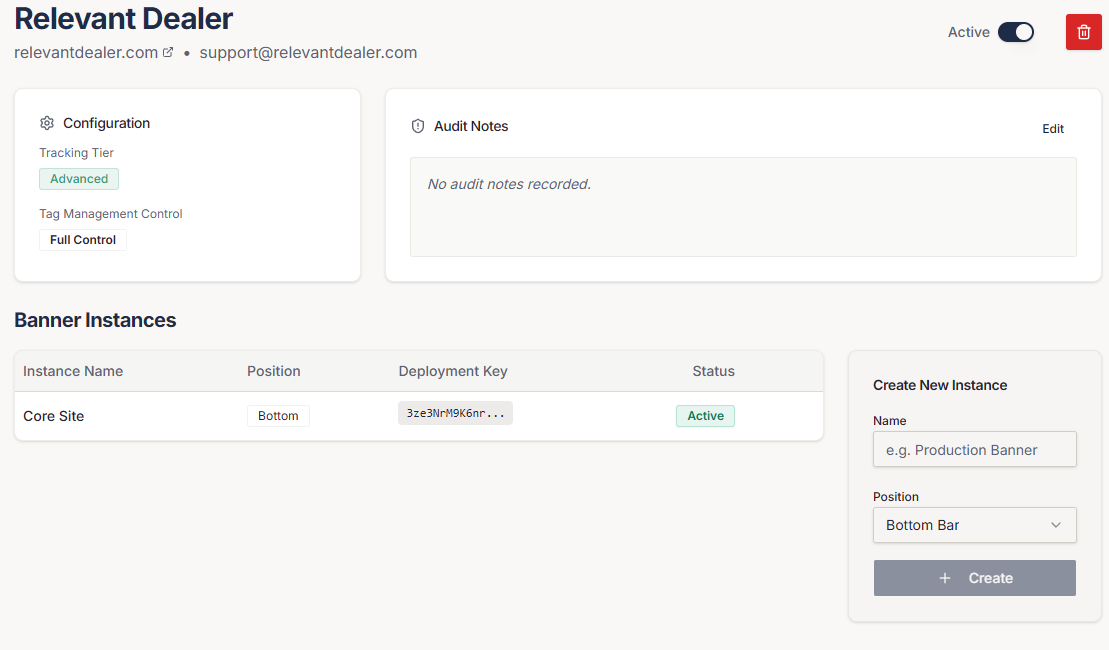
Consent workspace account overview listing client accounts, domains, and tracking tiers
Actual workspace screen: account overview.

Twelve stores. Six website providers. One way to handle consent.

Dealer groups rarely run one tidy stack. Every brand site has its own platform, its own GTM container, and its own mix of pixels. Consent ends up handled differently everywhere, or not at all.

Consent Banners gives each site its own instance, set up the same way, managed from one place.

Pick a tier per account

Match the banner to what the site actually runs.

Basic

Necessary only

For sites that run only what the website needs to work. No optional categories to manage.

  • Necessary (always on)included
  • Analyticsnot included
  • Advertisingnot included
  • Personalizationnot included
  • Identity resolutionnot included

Engagement analytics: not included
Ads

Optional analytics, advertising, personalization

For stores running analytics and paid media. Shoppers choose which optional categories to allow.

  • Necessary (always on)included
  • Analyticsincluded
  • Advertisingincluded
  • Personalizationincluded
  • Identity resolutionnot included

Engagement analytics: included

Advanced

Ads, plus identity resolution

Adds a separate identity-resolution category for setups that use that kind of tooling.

  • Necessary (always on)included
  • Analyticsincluded
  • Advertisingincluded
  • Personalizationincluded
  • Identity resolutionincluded

Engagement analytics: included

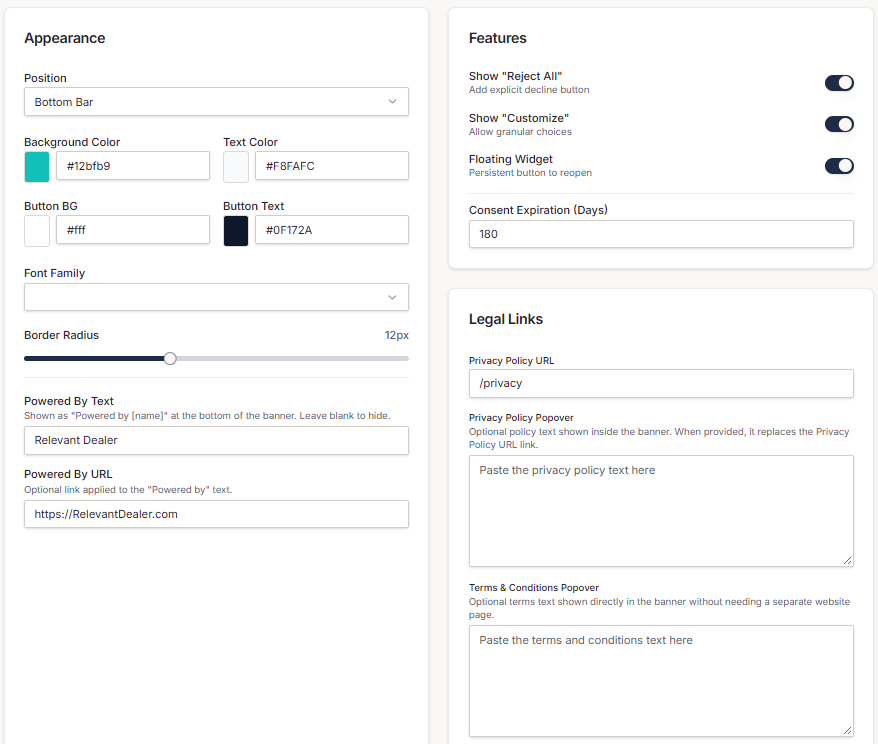
Banner settings screen with position, colors, font, and button options

Actual workspace screen: banner settings.

Per-instance control

Your store's banner, not a generic pop-up.

Accounts, domains, instances

Each client account carries its domain, contacts, and tracking tier. Run one banner instance or several per account.

Look like the store

Position, colors, font, corner radius, headline, body copy, and button labels are set per instance. Toggle Reject All, Customize, and a floating preferences widget.

Policies without a policy page

Link a Privacy Policy URL, or show privacy and terms text you supply in a popover. An optional Powered by label is your call.

Choices that expire sensibly

Consent lasts 180 days by default, and the window is configurable per instance.

Install and signals

Loads first. Starts at denied. Tells your tags what the shopper chose.

Google Tag Manager

Paste the Custom HTML snippet and fire it on Consent Initialization - All Pages, ahead of marketing tags.

Direct script

No GTM on the site? Use the script tag generated for that instance.

Consent Mode v2

Optional categories default to denied, update on the visitor's choice, and push to the dataLayer.

Controls apply to scripts deployed through the configured GTM container or loaded after the consent script. Hardcoded or external scripts outside that path are not blocked automatically.

Logs and engagement

See how shoppers answer.

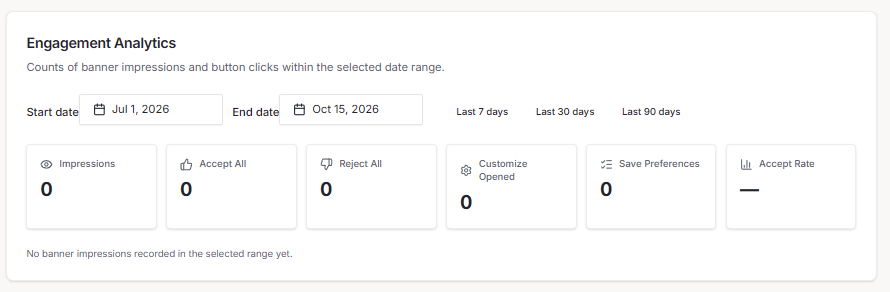
Every instance keeps consent logs. On Ads and Advanced, engagement analytics show impressions, accepts, rejects, customize opens, saves, and accept rate by date range.

Engagement analytics summary showing impressions, accept, reject, customize, save counts and accept rate

Actual workspace screen: engagement analytics (Ads and Advanced tiers).

The honest part.

Consent Banners is a configuration and deployment tool, not legal advice. It shows the policy text you or your counsel supply and does not write or validate it. It does not guarantee compliance with any law, and it does not automatically control every script on a page.

Questions dealers ask

Bring us your site list.

Tell us how many websites you manage and how tags are deployed today. We will show you the workspace and be straight about what it controls.

Want the full technical rundown? Read the detailed product page.